Raw File Structure
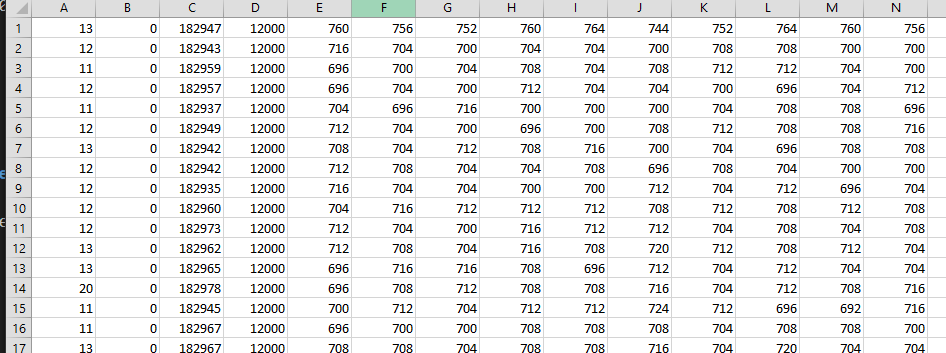 The raw files aren’t annotated, partially because only I bother to look at them, and partially because it makes it much easier when re-importing the files into the program. This page is to demystify what these files looks like and how you can view the raw data, should you want to. To clarify, this is for the light sensor data. Each row is a different test/click/flash. So if you do 100 clicks/shots, you’ll have 100 rows.
Here is the data with some headers. Basically:
- Column A is the click time in microseconds.
- Column B is the render time (also the system latency if you’ve run the pre-test before testing games) in milliseconds.
- Column C is the total amount of time taken to capture the samples (not including the click time, but including the render time/system time) in milliseconds.
- Column D is the total number of samples taken.
- Column E and onwards are the samples themselves.
If you want to measure a result manually, you’ll need to calculate the sample time (time taken divided by sample count, should be around 15.24us). Then graph one row samples: 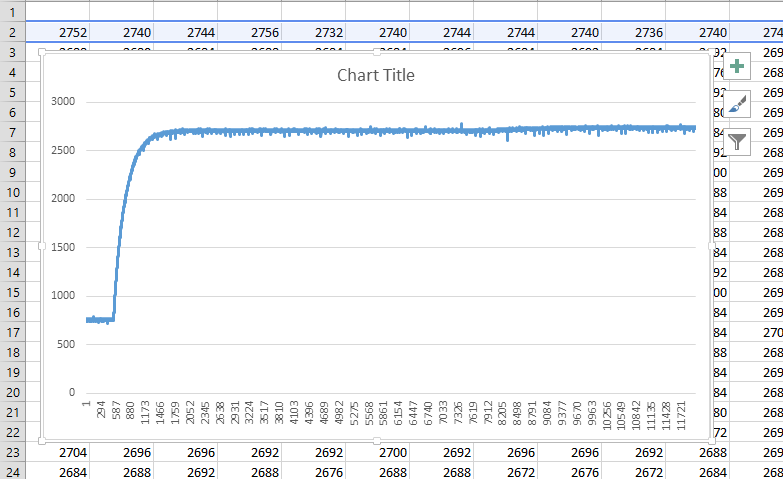 Pick out the starting sample number and multiply it by the sample time - in this image that’s around 536 * 15.24 (/ 1000 to milliseconds) 8.17ms.